




Estimated reading time: 6 minutes
Key Takeaways
- Cut Administrative Burden: AI-driven telemetry automates data compilation for ISO reporting, audits, and grant proposals (such as SS4A).
- Actionable Emergency Vehicle Preemption (EVP) Insights: Tools like Miovision’s Mateo analyze signal recovery times, corridor bottlenecks, and preemption requests without manual search through spreadsheets.
- Quicker health-checks: Fire Chiefs and Fleet Managers, can quickly audit vehicle communication and system health, faults, and areas of improvements
First Responder leadership comes with heavy administrative lift and many did not become a Chief to enter data. There’s increasing demand on maintaining or improving response times, especially in growing and increasingly congested cities. There’s also the challenges of securing funding, managing budget cycles, stakeholders, council reporting, ISO reporting, and insurance reporting or audits, not to mention managing crew safety.
Industries everywhere are feeling similar pressures of increasing responsibilities, and Artificial Intelligence (AI) is touted as the “force multiplier” that is allowing people to meet these challenges and essentially do more, in less time.
While AI can’t fight fires, it can assist First Responder leaders and administrators in alleviating some of the pressure of where to get started, how to get organized and even how to begin some of these routine or ad-hoc tasks that take away from the field work.
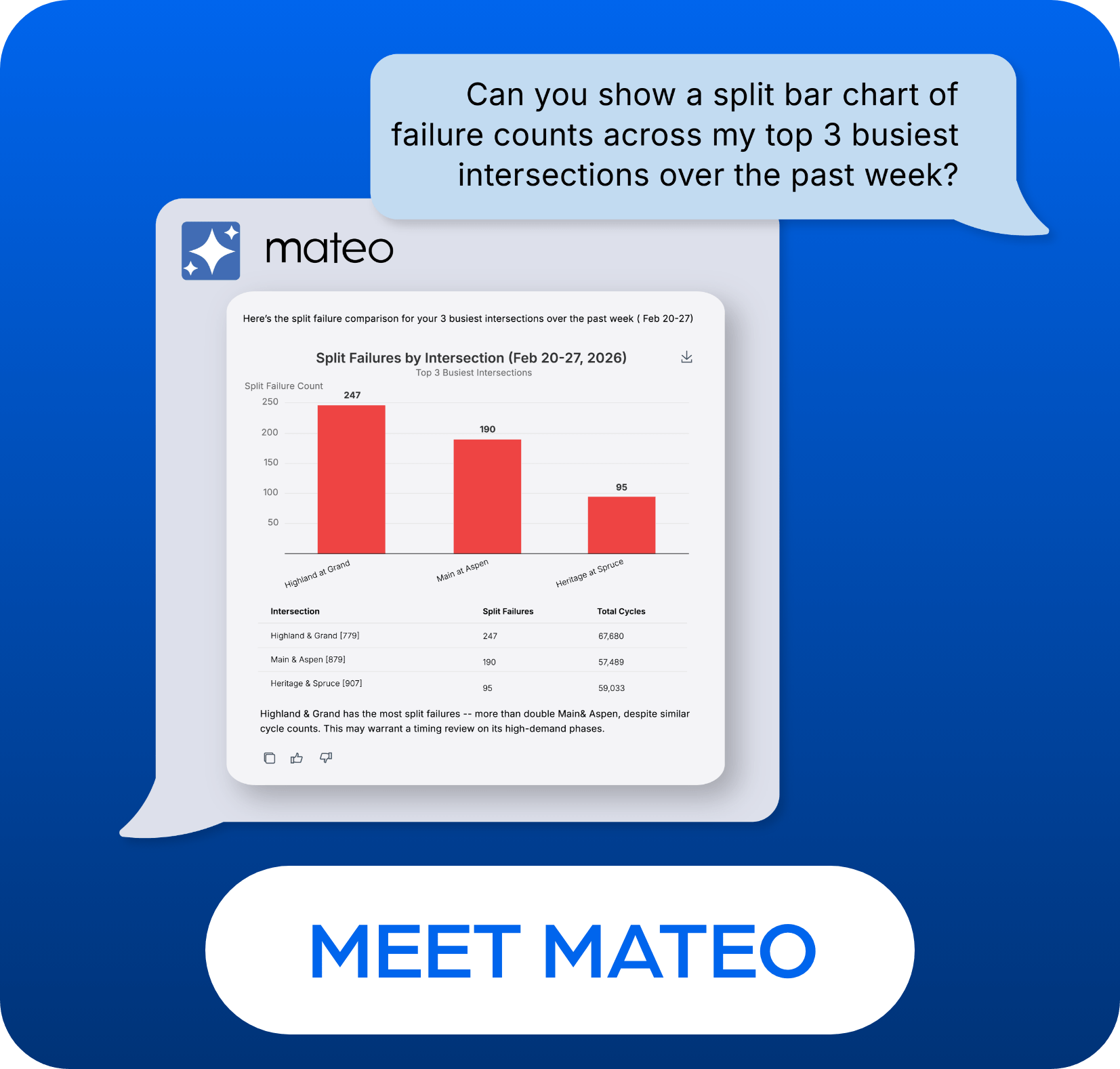
At Miovision, we have developed our own AI Assistant specifically trained on traffic and Opticom technologies that can help First Responder leadership improve their response times and crew safety within an Emergency Vehicle Preemption (O) context. Our data teams have trained and refined our AI tools to understand nuances in traffic and emergency response, as well as challenges and context/constraints that Fire Chiefs, Police Chiefs, and Fleet Managers have to operate within.
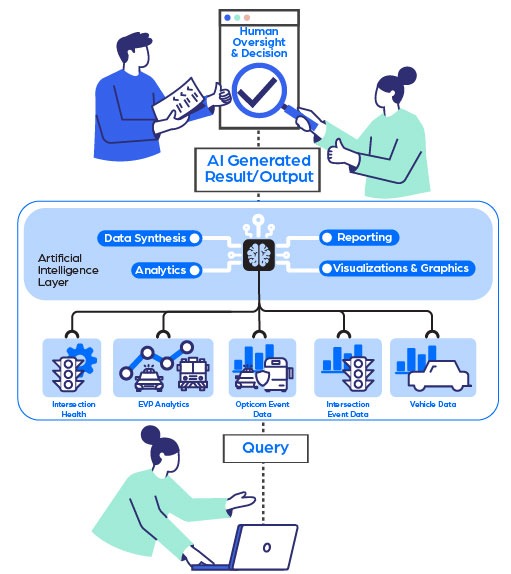
Our AI tools are designed to support operations, conversationally. Using natural language to ask AI questions typical to your work, AI evaluates all the information available in your Miovision One account, any context you share (uploaded files or context) and surfaces up information that empowers you to take action. Humans are always in charge and have the final say.
Meet Mateo: Miovision’s GenAI Assistant for First Responders
Mateo is an AI intelligence partner that is built to understand complexities and realities of first responder jobs, as it relates to traffic. It is purpose-built to translate EVP telemetry and traffic patterns into actionable insights, contextualizing any results and outputs it generates to roles related to first responders.
Data becomes actionable with AI Studio
Miovision AI Studio (powered by the GenAI Agent, Mateo) is an advanced generative-AI workspace builder. While most data dashboards are largely closed, pre-built systems, AI studio allows users to be the master of their data. It lets decision-makers generate and interact with customized, real-time interactive environments, answering questions and updating dashboards in minutes.
Read on to see some examples of how Miovision’s AI tools can be used within EVP.
Strategic Planning and Resource Allocation for Chiefs
There’s the hurdle of balancing rapid response times with administrative compliance and budget constraints. When chiefs want to understand how to improve response times, address road safety concerns, or justify requests for new capital expenditures, Mateo and AI can answer these complex questions in minutes.
Visualizing EVP request frequency
When crews report that getting from Station A to Zone B is taking too long, or that specific corridors are cumbersome to clear, Chiefs need to know whether the issue is signal preemption, peak congestion, or emergency access bottlenecks.
EVP provides green lights, but if overall traffic volume is severely backed up, green signals alone may not be enough. Chiefs need clear evidence to help decide whether to request adjusted signal timing from traffic engineers, evaluate station exit clearance, or justify capital investments like a new station location.
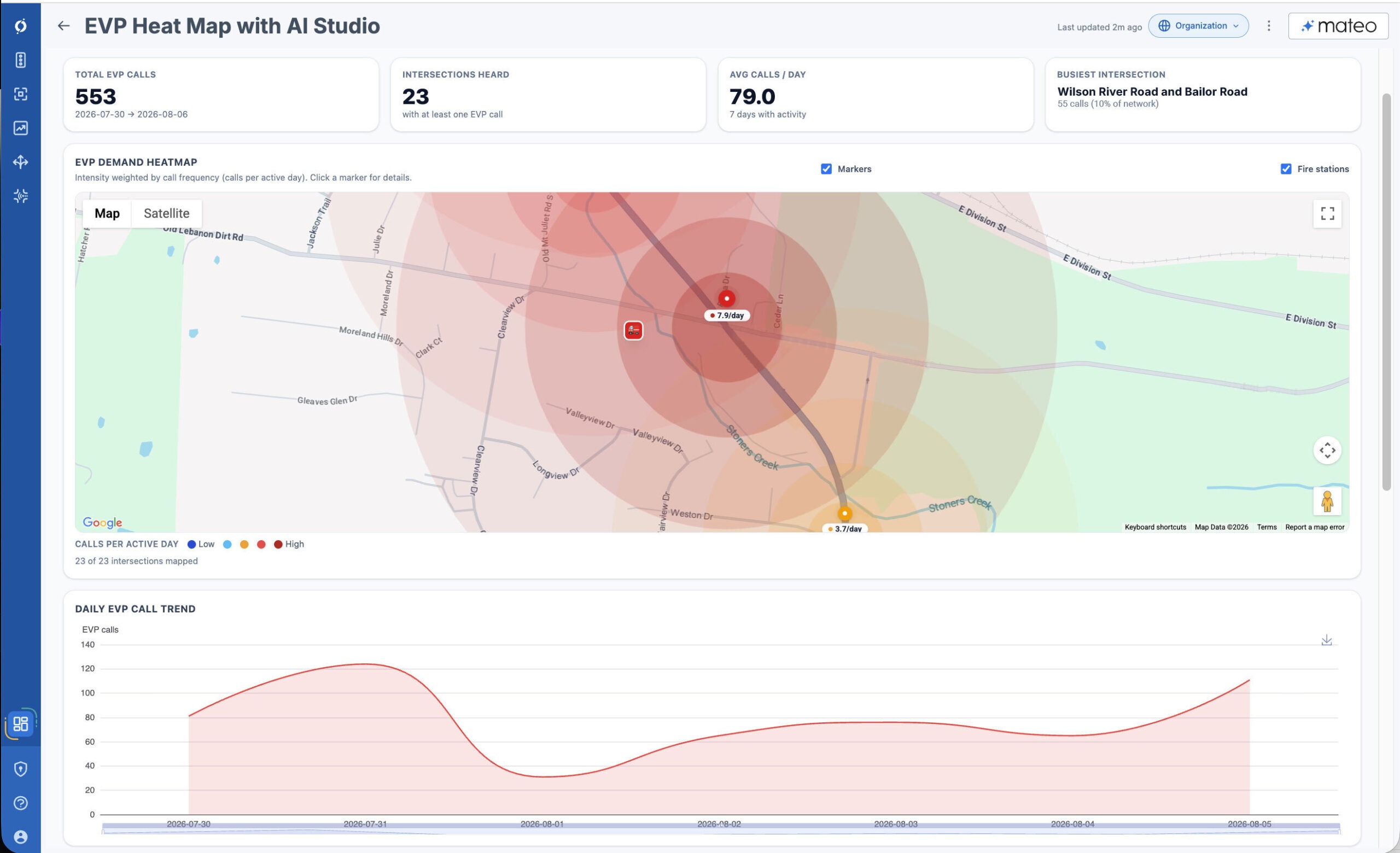
Using Mateo and AI Studio, Chiefs can instantly map out preemption activity without sifting manually through spreadsheets and maps:
- Visual Heatmapping: Generate interactive heat maps that pinpoint your busiest, most frequently preempted intersections and identify high-demand corridors at a glance.
- Time-Based Filtering: Filter preemption requests by specific hours, days of the week, or seasonal date ranges to see if delays correlate with peak commuter hours, local events, or school schedules.
- Targeted Action: Determine if an issue stems from signal recovery timing, egress conflicts right outside station doors, or broader network congestion that requires joint action with traffic engineering teams.
Sample Prompt:
“Create an interactive map showing our busiest intersections by EVP requests over the last month, with filters for time of day and day of the week so I can evaluate corridor congestion. “
Use Case: Support Grant Writing and Funding Requests
Grants are an important source of funding, and writing grants can sometimes be an art. On top of writing, there is often a lot of work and coordination required; you need to identify what data you may need to support your case, retrieve it, analyze it, and craft a compelling narrative from that.
Mateo and AI studio can make this process less painful and quicker. Using Opticom data from your Miovision One account, and any Notice of Funding Opportunity guides you upload to Mateo, it can do an analysis on how you can support your request for funding, and suggest some responses.
If it lacks certain data necessary to fill out the funding, it will flag this, and suggest possible areas to look for the information. The results can be attached as an appendix, or be used as a starting point to get through grant writing quicker.
Sample Prompt:
“I am a [insert role] at [insert public safety agency department]. Please assess this Safe Streets for All NOFO and help me understand how I can qualify for this grant for my department. Flag any areas where you don’t have data to support, and be as accurate as possible.”
Fleet Readiness and Operational Monitoring for Public Safety Fleets
Fleet Managers need to balance managing growing fleets and testing, maintaining, and implementing new technologies. This can often require routine checks, inventory assessments and evaluating ad-hoc concerns that can disrupt operations. AI can help Fleet Managers prioritize their focus, especially with mixed-fleet support (patrol cruisers, SUVs, engines, ladder trucks).
Fleet Readiness Monitoring
Keeping an emergency fleet response-ready requires regular oversight of hardware/connection status, vehicle communication, and preemption equipment health.
Traditionally, fleet managers would manually comb through log data, cross-reference vehicle configurations, and investigate individual vehicles to determine if they are communicating correctly with their preemption service.
With Mateo, Fleet Managers can take vehicle inventory in Miovision One and Opticom data to more quickly do inventory and status audits, conversationally.
Speeding up vehicle communication health checks
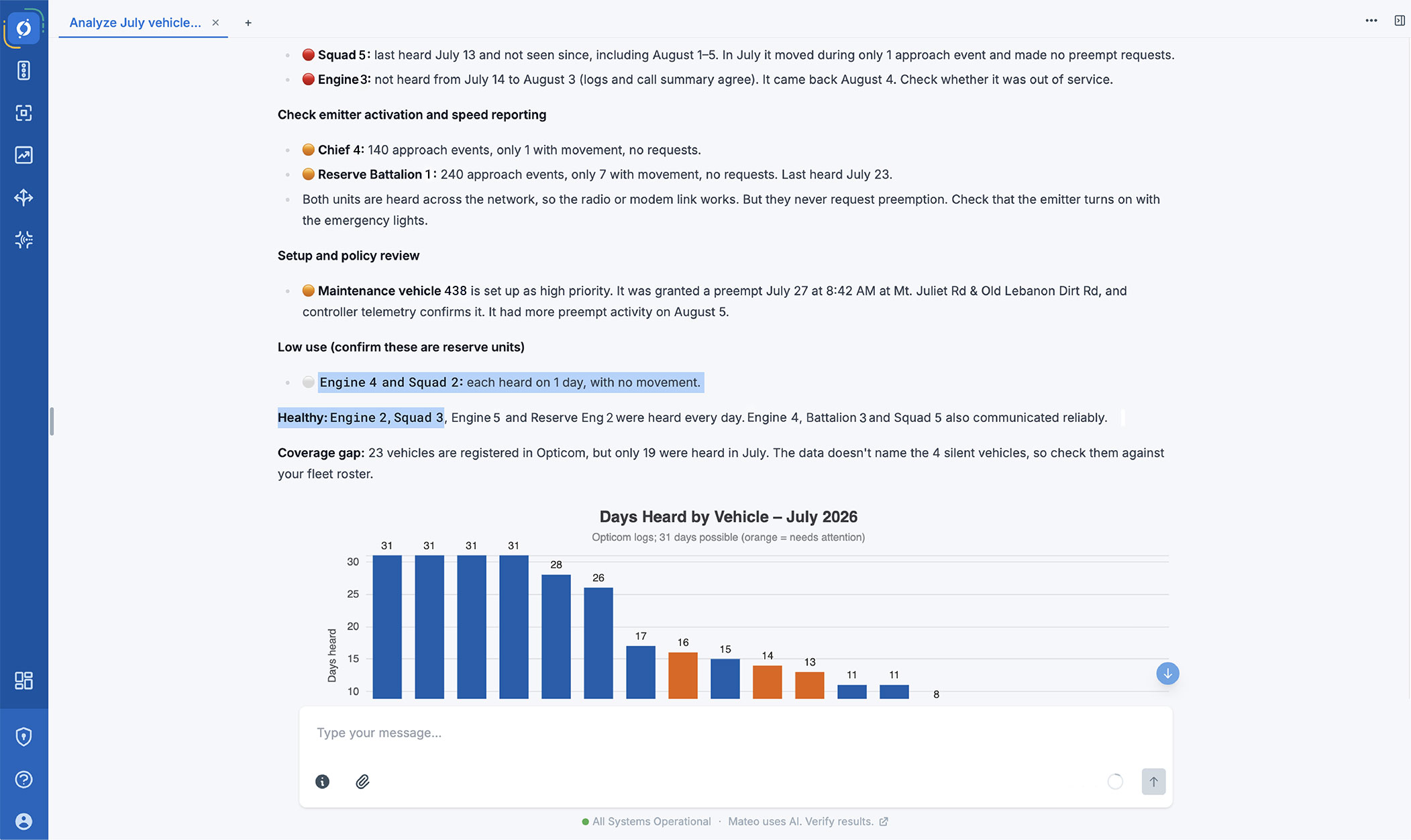
First responder vehicles get so much use they tend to accumulate wear and tear faster. Fleet managers need to regularly check vehicle health, and this can include communication in vehicles. In between regular checks, fleet managers can use Opticom EVP to do a quick scan to catch if something is amiss with vehicle comms to Opticom equipped intersections by using Mateo – no in-vehicle check required.
Sample Prompt:
“I am a fleet manager and want to make sure our vehicle health is good and vehicles are communicating with the system. For the month of July, look at my vehicle data and tell me if there are trends in vehicle communications that I need to be aware of.”
Getting Started with the Basics of AI
Artificial Intelligence is easy to pick up and work with. Many can be interacted with conversationally via “prompts”, meaning anyone can converse with the AI tool as they would another person.
Tip: A prompt is an instruction or question that tells AI what to do, or what to help you with.
Unlike a person you would speak to however, the AI tools may lack some context on who you are, and any requirements that might be needed when responding to the prompt, so it is worth following some best practices to ensure a smooth experience and greater relevance to what you want it to do.
Crafting a good prompt
An effective prompt is the key to getting actionable, high-quality results from generative AI. You get what you put into your conversations: to get accurate, tailored outputs, use the C.O.R.E. framework:
- C – Context: Provide background details. You can assign a specific role to the AI, remind AI who you are and why this is important to you, explain relevant history or nuance, and outline key information it needs to understand your scenario.
- O – Objective: Clearly state your goal and instructions. Detail the exact task you want completed, such as “I am a Fire Chief and I want to understand our travel time. Map out my busiest intersections and show me where fire stations are”.
- R – Requirements: Define boundaries, parameters, and constraints. Outline specific timeframes, word limits, or focus areas, such as “Analyze peak AM traffic on weekdays” or “Keep under 500 words”.
- E – Execution: Specify the exact format for the final output. Indicate whether you need a bulleted list, an executive report, a graph, a map, or a time-space diagram.
Other best practices
To make the most out of conversational tools, follow these best practices:
- Double check the responses you receive, and provide feedback (thumbs up/thumbs down) if you are happy or unhappy. Challenge AI tools you use to provide it’s reasoning for how it arrived to a certain conclusion.
- Ask for iterations if you’re unsure or unhappy with the result. You can provide feedback and ask Mateo to be more specific, dig into something in particular.
- Start new chats for new topics or questions. This helps keep context clear for the AI tool, and reduces the amount of memory the conversation takes up on the system.
- Break down complex tasks. If you want to do a multi-step process, start by asking for step one, and solve for step one before moving to step two.
- Do not upload personally identifiable or sensitive information as a general best practice.
Limitations
Mateo is a type of Large Language Model (LLM) AI tool. These types of tools can provide slightly different responses to the same question. Results might be formatted differently if asked repeatedly, or if you are looking to replicate this response in another session, you might find differences in the answers you get. You can help reduce the variations by asking the AI for specific response styles such as charts, tables, dashboards etc.
AI will also make reasonable estimations, much like a human. Unlike a human, it may not have all the context you know to self-edit, so you should double check responses or try to determine if this is a reasonable response. This keeps the human-in-the-loop.
Discover What AI Can Do for EVP
Every day dozens of AI use cases are cropping across various industries, and First Responder industries are no exception. Many first responder tools are seeing AI woven into day-to-day operations, such as in bookings software, incident reporting and more.
Within the context of EVP, there are growing opportunities where AI can provide value. Getting comfortable with, and confident in AI usage can help reduce the work that you may not want to do, but have to do, and help reduce administrative burden. More importantly, it can help with budget cycles, funding, and improving response times and crew safety, which can reap benefits beyond your department and into the communities.